Api Gateway Rate Limiter Design
High level requirement
Imagine you are tasked to design an API gateway to rate limit your exposed public API’s.
First thoughts
- Consider this as an algorithm question, How would you even design a
rate limiter? - What would be the input and output to such an algorithm?
- If you even have a rate limiter then how are we going to test it’s performance on load?
- What are the different policies used in rate limiters?
Learnings
Interface
Let’s first design the basic interface of a rate limiter
public abstract class RateLimiter {

  protected final int maxRequestPerSec;

  protected RateLimiter(int maxRequestPerSec) {
    this.maxRequestPerSec = maxRequestPerSec;
  }

  abstract boolean allow();
}
- We have an abstract class called RateLimiter which taken in the maximum allowed hit rate as it’s constructor parameter.
- We have a method interface called
allow()that returns a boolean which tells the caller whether this request is allowed or dropped by the gateway
Testing
Assume you have a rate limiter implemented and given to you, what sort of testing framework would you use to evaluate its performance ?
Here is one way below
public class Solution {

    public static void sendRequest(RateLimiter rl, int totalRequests, int requestRate) {

        long startTime = System.currentTimeMillis();
        CountDownLatch cdl = new CountDownLatch(totalRequests);

        for(int i=0; i<totalRequests; i++) {
            new Thread(() -> {
                while(!rl.allow()) {
                    try{
                        Thread.sleep(10);
                    } catch(InterruptedException ie) {
                        throw new RuntimeException(ie);
                    }
                }
                cdl.countDown();
            }).start();

            try{
                Thread.sleep(1000/requestRate);
            } catch(InterruptedException ie) {
                throw new RuntimeException(ie);
            }
        }

        try{
            cdl.await();
        } catch(InterruptedException ie) {
            throw new RuntimeException(ie);
        }


        double duration = (System.currentTimeMillis() - startTime) / 1000.0;
        System.out.println(totalRequests + " requests processed in " + duration + " seconds. " + "Rate: " + (double) totalRequests / duration + " per second");

    }

    public static void main (String[] args) throws java.lang.Exception
    {
        // your code goes here
        RateLimiter rl = new ImplementationBasedRateLimiter(20);
        Thread thread = new Thread(() -> {
                sendRequest(rl, 10, 1);
                sendRequest(rl, 20, 2);
                sendRequest(rl, 50, 5);
                sendRequest(rl, 100, 10);
                sendRequest(rl, 200, 20);
                sendRequest(rl, 250, 25);
                sendRequest(rl, 500, 50);
                sendRequest(rl, 1000, 100);
            });

        thread.start();
        thread.join();
    }
}
Ok, there is a lot of things going on here. Let me disect them and explain one by one.
Let’s look at the main function
- First the main function initializes a rate limiter
- Second, the main function prepares a batch of tests.
- Each
sendRequest()method is a test. - It takes in the
rateLimiteras first argument,total number of requestsas second argument, therequest rate(requests per second) as the third argument
Now let’s look at each sendRequest() test
- The objective of this method is to launch
totalRequestsnumber of requests against the rate limiter at therequest ratepace. - To do that we can send each request after a time interval of
(1000/requestRate)milliseconds. Simple math :) - This is achieved by iterating over a for loop and waiting for (1000/requestRate) milliseconds after every iteration
- In each iteration, if we simply launch a new thread that checks for the rate limiters
allow()method to be true just once, then we are not replicating real testing scenario. - In each iteration, the thread launched has to keep trying the allow() method of the rate limiter untill it returns true.
- Hence we use a
while loopin the launched thread of each iteration - Now, is that enough. Nope, because the main thread needs to wait till all the threads have finished execution.
- Best way to ensure that is to use a
CountDownLatchand let the main thread wait till all the threads have decremented the latch to zero. - The remaining part is simply measuring
execution metricsand printing to the console.
Implementations
Below are top implementations of algorithms of rate limiter abstract class
Leaky Bucket Algorithm
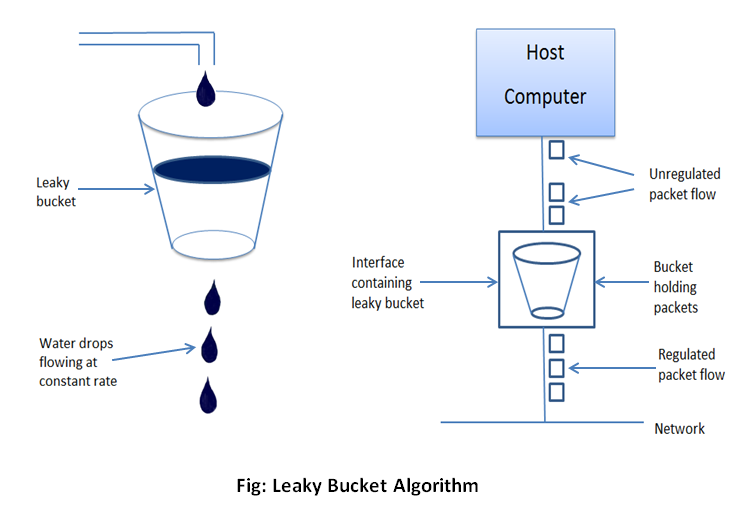
In this algorithm, we have a bucket of limited capacity.
The bucket takes in requests and churns out responses
If the capacity of the bucket is full, then the future incoming requests will simply be denied
Implementation below
public static class LeakyBucketRateLimiter extends RateLimiter {

    private long nextAllowedTime;

    private final long TIME_INTERVAL_BETWEEN_REQUESTS;

    public LeakyBucketRateLimiter(int maxRequestPerSecond) {
        super(maxRequestPerSecond);
        TIME_INTERVAL_BETWEEN_REQUESTS = 1000/maxRequestPerSecond;
        nextAllowedTime = System.currentTimeMillis();
    }

    public boolean allow() {
        long currentTime = System.currentTimeMillis();
        synchronized(this) {
            if(currentTime>=nextAllowedTime) {
                nextAllowedTime = currentTime + TIME_INTERVAL_BETWEEN_REQUESTS;
                return true;
            }

            return false;
        }
    }
}
- Maintain two variables
nextAllowedTimeandTIME_INTERVAL_BETWEEN_REQUESTS. - TIME_INTERVAL_BETWEEN_REQUESTS = 1000/maxRequestPerSecond. Simple Math :)
- Check if the current time is greater than next allowed time, if it is then allow the request or else reject it
- Keep updating next allowed time
Token Bucket Algorithm
Assign a token to every request received.
If there is an incoming request and there are no more tokens to give out then drop the request.
public static class TokenBucketRateLimiter extends RateLimiter {

    private int numberOfTokens;

    public TokenBucketRateLimiter(int maxRequestPerSecond) {
        super(maxRequestPerSecond);
        numberOfTokens = maxRequestPerSecond;
        new Thread(() -> {
            while(true) {
                try{
                    TimeUnit.SECONDS.sleep(1);
                } catch(InterruptedException ie) {
                    throw new RuntimeException(ie);
                }
                refill(numberOfTokens);
            }
        }).start();
    }

    public boolean allow() {
        synchronized(this) {
            if(numberOfTokens>0) {
                numberOfTokens--;
                return true;
            }
            return false;
        }
    }

    private void refill(int cnt) {
        synchronized(this) {
            numberOfTokens = Math.min(numberOfTokens + cnt, this.maxRequestPerSecond);
            notifyAll();
        }
    }
}
- Let numberOfTokens variable denote the current number of tokens in the bucket
- Each token in numberOfTokens is assigned to a request
- We need a background thread to keep refilling the bucket, so that maxRequestsPerSecond number of tokens are available in the bucket every second
refill()function takes in the number of tokens to refill the bucket withallow()is implemented by checking if there are any tokens available to be handed out to the caller.
Fixed Window Algorithm
We slice the timeline from 0 to infinity into small time intervals of 60 seconds each
We make sure that in each interval, the number of requests do not exceed the total allowed number of requests in that interval
Implementation below
public static class FixedWindowCounterRateLimiter extends RateLimiter {

    private final ConcurrentMap<Long, AtomicInteger> windowMap;

    public FixedWindowCounterRateLimiter(int maxRequestPerSecond) {
        super(maxRequestPerSecond);
        this.windowMap = new ConcurrentHashMap();
    }

    public boolean allow() {
        long currentTimeInMillis = System.currentTimeMillis();
        long windowIndex = currentTimeInMillis/(60*1000);
        windowMap.putIfAbsent(windowIndex, new AtomicInteger(0));
        return windowMap.get(windowIndex).incrementAndGet() <= this.maxRequestPerSecond;
    }
}
- We first create a map whose
keyis thetime interval indexandvalueis thenumber of requestsin that window - In the allow method we first get the time interval index and check for that time interval whether we have requests remaining.
- Then we atomically increment the value before sending out the result;
Sliding Window Log algorithm
In this algorithm, we move the window used in the previous algorithm with us in real time.
So if we receive a request, we make sure that in the time window [current-time - 60, current-time] we have not exceeded the limit on the number of requests
Implementation below
public static class SlidingLogRateLimiter extends RateLimiter {

    private final Queue<Long> q;

    public SlidingLogRateLimiter(int maxRequestPerSecond) {
        super(maxRequestPerSecond);
        q = new LinkedList();
    }

    public boolean allow() {
        long currentTime = System.currentTimeMillis();
        long boundary = currentTime - 60;
        synchronized(this) {
            while(!q.isEmpty() && q.peek()<boundary) {
                q.remove();
            }

            q.add(currentTime);

            if(q.size() <= maxRequestPerSecond) {
                return true;
            }
            return false;
        }
    }
}
- We maintain a
Queueof all the incoming request timestamps - The
allow()method take the current time and clears all the requests that arrive before (currentTime - 60) - Finally it adds the current request time to the queue and checks whether the queue’s size is lesser than the maximum requests per second
Sliding Window Rate Limiting Algorithm
This is very similar to the previous approach.
Instead of including each timestamp in the previous window, we simply maintain the previous windows request count.
When the window moves 25% away from previous window, then we include 75% of the previous window count along with the requests we found so far to the total request count.
Implementation below
public static class SlidingWindowRateLimiter extends RateLimiter {

    private final ConcurrentMap<Long, AtomicInteger> windowMap;

    public SlidingWindowRateLimiter(int maxRequestPerSecond) {
        super(maxRequestPerSecond);
        this.windowMap = new ConcurrentHashMap();
    }

    public boolean allow() {
        long currentTime = System.currentTimeMillis();
        long currentWindowKey = currentTime / (1000*1000);

        windowMap.putIfAbsent(currentWindowKey, new AtomicInteger(0));


        long preWindowKey = currentWindowKey - 1000;
        AtomicInteger preCount = windowMap.get(preWindowKey);
        if(preCount == null) {
            return windowMap.get(currentWindowKey).incrementAndGet() <= this.maxRequestPerSecond;
        }

        double preWeight = 1 - (currentTime - currentWindowKey) / 1000.0;
        long count = (long) (preCount.get() * preWeight + windowMap.get(currentWindowKey).incrementAndGet());
        return count <= maxRequestPerSecond;
    }
}
- Maintain a map of
window indexaskeyandnumber of requestsasvalue - When the
allow()method is called we first retrieve the window index from current time. - We then retrieve the previous window key and the previous window count
- Then we determine how far into the current window we are, using which we determine the weights
- We then use the weights to get the weighted count and check if its below the allowed limit